
Wonster Words · Support
How can we help?
Answers to the most common questions about playing Wonster Words, your subscription, and your account. Still stuck? We're one email away.
Last updated
Getting started
Downloading & playing
How do I download Wonster Words and start playing?
1. Download the app. Wonster Words is available on the Apple App Store and Google Play. Search “Wonster Words,” scan the QR code below, or use the store links.
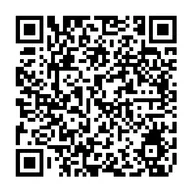


Tablets and mobile devices only. The download page has the same links, plus what the app costs and which devices it runs on.
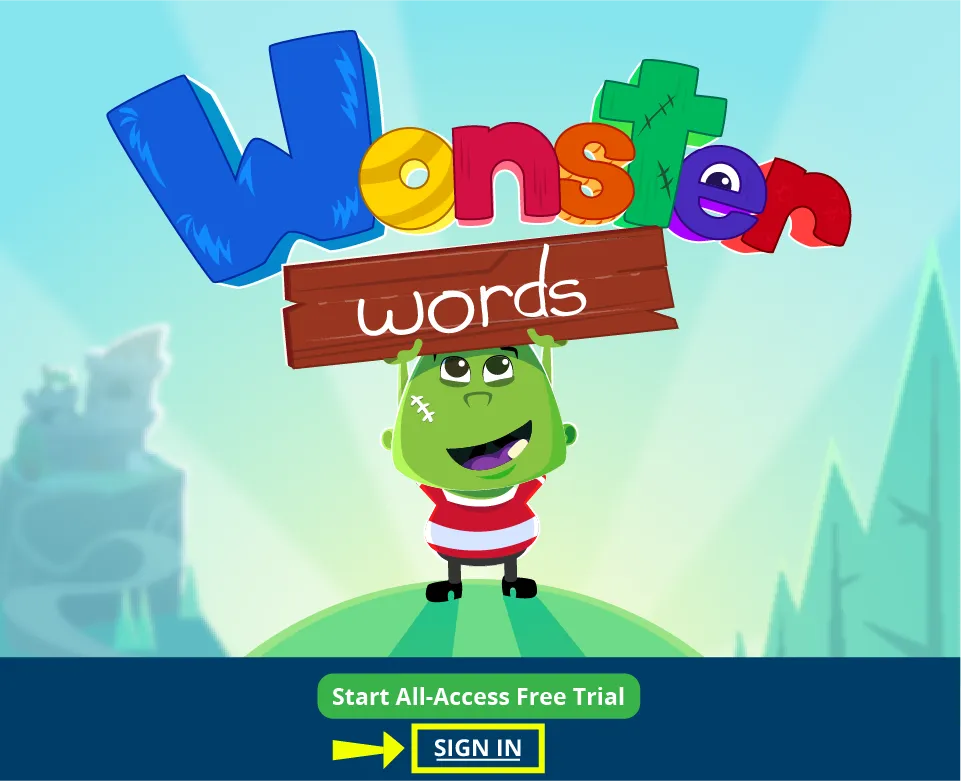
2. Sign in on your device. Open the app and tap Sign In, then enter the email address you used to create your account. We’ll email you a verification code to finish signing in.
What is a Wonster Account and how do I set one up?
A Wonster Account keeps your subscription and your child’s progress in one place, so you can sign in on any device and pick up right where you left off.
You’ll create your account the first time you start a free trial or subscribe. Enter your email address and we’ll send a verification code to confirm it. There’s no password to remember, you sign in with a fresh code each time.
Your Wonster Account is separate from your Apple ID or Google account. You’ll need to create it on its own using the steps here.
Don’t have an account yet?
You’re usually prompted to create one when you subscribe. If you weren’t, set it up on the device where you made the purchase: open the For Parents section, tap Account, and add your account email.
Signing out of a device
Open the For Parents section and tap My Account. You’ll see the email your account is registered to, along with a Sign Out option.
How do I restore previous Wonster Words purchases?
Already paid for Wonster Words but had to reinstall it? You can restore your purchase, no need to buy anything again.
Look for a Restore Purchase link on the purchase screen (exactly where it appears depends on your version of the app). Tap it, and once the restore finishes, you can access your content again.
Still don’t see your purchases? Email us at [email protected].
How do I unlock all the content?
Wonster Words is built around progress paths, so kids advance step by step and feel a sense of momentum. We know that doesn’t suit every learning situation, so you can switch off the progress paths and use library view instead, which opens up all of the content to play in any order.
- Go to the For Parents section of the app.
- Select Account.
- Underneath the account email options, check the I am an educator box.
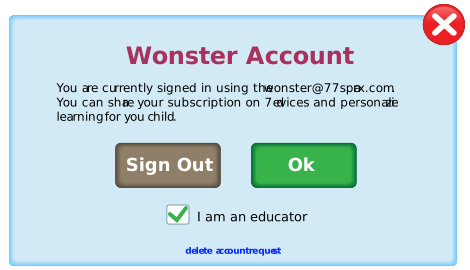
When you return to the app, all of the content will be unlocked.
Anything played in library view won’t affect your progress paths. Switch back to progress view and you’ll pick up right where you left off.
Subscription & billing
Managing your plan
How do I manage or cancel my subscription?
Wonster Words subscriptions are billed through the app store you signed up with. You can check your status, renewal date, and where you’re being billed on our Account & Billing page, but any changes have to be made wherever you originally subscribed.
Subscribed on our website? Manage it from the Account & Billing section of your account page.
Subscribed through Apple (iOS)? Open Settings, tap your name, tap Subscriptions, select Wonster Words, and choose Cancel Subscription.
Subscribed through Google Play (Android)? Open the Play Store, tap your profile, go to Payments & subscriptions → Subscriptions, select Wonster Words, and tap Cancel.
When you cancel, you keep access until the end of your current billing period, and you won’t be charged again.
When does my subscription renew?
It renews automatically unless you cancel at least 24 hours before the current period ends. Stores usually take payment about 24 hours ahead of the renewal date, so canceling the day it renews is often too late to stop that charge.
I got a trial confirmation email. Am I being charged?
No. Some stores send a confirmation email as soon as a free trial starts, and it should show a charge of $0.00. You’re only charged when the trial turns into a paid subscription. If your email shows anything other than $0.00, forward it to us and we’ll look into it.
Does deleting the app cancel my subscription?
No. Deleting Wonster Words removes the app, not the subscription, because the app store handles the billing. Cancel it using the steps above, or you’ll keep being charged.
Can I switch to a different plan?
Not while a subscription is active. To move to a different plan, cancel your current one and wait for it to expire at the end of your billing period. You can then sign up for the plan you want.
Can I start another free trial?
Free trials are one per account, so we aren’t able to offer another one to the same account.
We can’t see whether you’ve used a trial before, your app store tracks that. If the store has your trial marked as already claimed, you’ll be charged when you sign up rather than receiving another free trial period.
Can I request a refund?
Yes, within 30 days of your purchase. Where to send the request depends on where you subscribed.
Subscribed on our website or through Google Play? Email us at [email protected]. Send it from the email address on your subscription, or include that address in your message, so we can find your account.
Subscribed through Apple? Apple handles all refunds for App Store purchases, so we aren’t able to process these for you. Follow Apple’s steps for requesting a refund.
Refunds through Apple are decided by Apple, and they may turn down a request. We aren’t able to reverse or override their decision.
Account management
Your account & data
How do I delete my account?
Deleting your account removes all associated data, including in-app progress and purchase history. Once an account is deleted, it cannot be restored.
Before you can delete your account, you’ll need to cancel your subscription and let it expire. Your subscription expires at the end of your latest billing period.
Once your subscription is canceled and expired, email your deletion request to [email protected].
How do I unsubscribe from the mailing list?
You can unsubscribe here, just enter the email address you’d like removed. Every email we send also has an Unsubscribe link at the bottom.
Unsubscribing from the mailing list doesn’t cancel your subscription or delete your account, those are handled separately.
Contact us
Still need a hand?
We love hearing from you. Send us any issues, questions, or feedback about the app and we'll get back to you.
✉ [email protected]