
Wonster Words · Support
How do I unlock all the content?
Wonster Words is built around progress paths, so kids advance step by step and feel a sense of momentum. We know that doesn’t suit every learning situation, so you can switch off the progress paths and use library view instead, which opens up all of the content to play in any order.
- Go to the For Parents section of the app.
- Select Account.
- Underneath the account email options, check the I am an educator box.
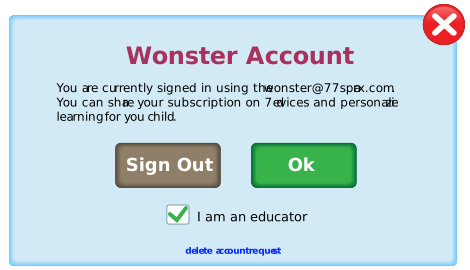
When you return to the app, all of the content will be unlocked.
Anything played in library view won’t affect your progress paths. Switch back to progress view and you’ll pick up right where you left off.
Last updated
Related answers
Contact us
Still need a hand?
We love hearing from you. Send us any issues, questions, or feedback about the app and we'll get back to you.
✉ [email protected]